

Paper shredder jams can bring productivity to a grinding halt in any office environment. These frustrating interruptions waste valuable time and can even damage expensive equipment. However, most jams are entirely preventable with proper knowledge and maintenance practices. This comprehensive guide will show you how to keep your office shredder running smoothly throughout the workday.
Understanding Why Shredders Jam
Shredders jam for several common reasons. Knowing these causes helps you avoid problems before they start. Most issues stem from user error rather than equipment failure. Therefore, educating your team about proper shredder use makes a significant difference.
The internal mechanisms of shredders are designed to handle specific capacities. When these limits are exceeded, the cutting blades cannot process the material effectively. Consequently, paper gets stuck between the blades, creating a jam that requires manual intervention.
Additionally, environmental factors play a role in shredder performance. Humidity affects paper texture, making it more likely to stick together. Dust and debris can accumulate on the blades over time. These factors combine to create conditions where jams become more frequent.
The Dangers of Overfeeding Your Shredder
One of the most common mistakes in busy offices is overfeeding shredder machines. Every shredder has a maximum sheet capacity listed in its specifications. This number represents the optimal amount of paper the machine can handle at once.
When employees rush through shredding tasks, they often grab thick stacks of paper without counting. This habit leads to immediate problems. The motor struggles to pull the excess paper through the cutting mechanism. As a result, sheets bunch up and create a jam.
Moreover, repeatedly exceeding capacity puts strain on the motor. This wear and tear shortens the lifespan of your equipment significantly. What seems like a time-saving shortcut actually costs more money in repairs and replacements down the line.
To prevent this issue, clearly post the sheet capacity near each shredder. Create visual guides that show what the maximum stack looks like. Encourage staff to count sheets or use the shredder’s capacity as a firm guideline. These simple steps dramatically reduce jam frequency.
Proper Feeding Techniques for Smooth Operation
The way you insert paper into the shredder matters just as much as the quantity. Paper should be fed evenly into the center of the feed opening. Crooked or off-center insertion causes uneven pressure on the blades.
Start by straightening your stack of papers before shredding. Remove any staples, paper clips, or binder clips beforehand. These metal objects can damage the cutting blades and create immediate jams. Furthermore, they pose safety risks to the equipment and users.
Feed paper slowly and steadily rather than forcing it into the machine. Let the shredder pull the paper at its own pace. Forcing paper disrupts the natural feeding rhythm and increases jam likelihood. Additionally, wait until the current batch finishes shredding before adding more paper.
Consider the paper orientation as well. Feeding sheets lengthwise versus widthwise can affect how smoothly they process. Experiment with your specific model to find which orientation works best. This small adjustment can make a noticeable difference in performance.
Essential Maintenance with Lubrication Sheets
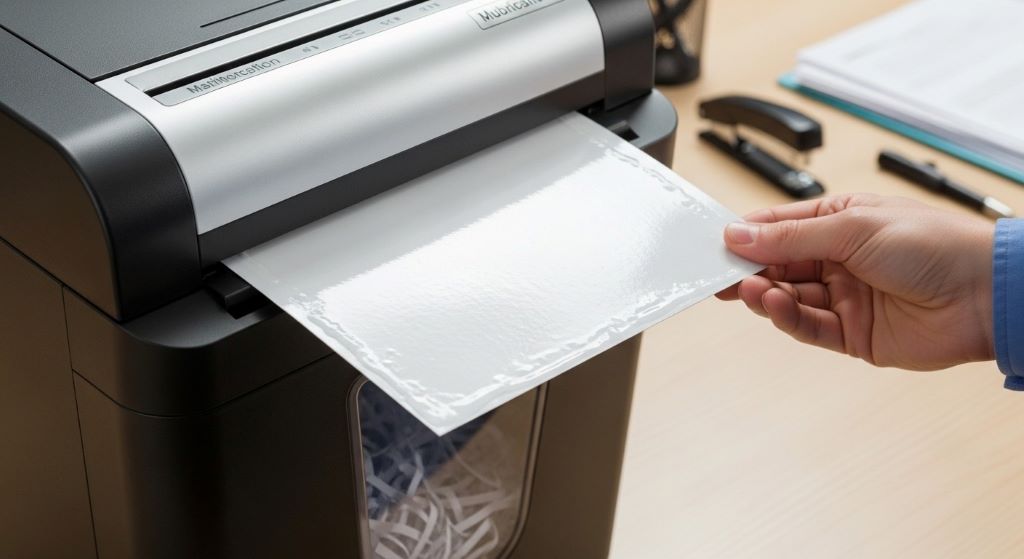
Regular maintenance keeps shredders operating at peak efficiency. One of the most effective maintenance tools is lubrication sheets. These specially designed products keep the cutting blades working smoothly and prevent buildup.
Lubrication sheets work by applying oil directly to the cutting mechanism as they pass through. This process is much cleaner and more efficient than manual oiling methods. The sheets distribute lubricant evenly across all blade surfaces, ensuring comprehensive coverage.
Most manufacturers recommend using these sheets once per month for standard office use. However, high-volume environments may require more frequent application. Pay attention to your shredder’s performance as a guide. If you notice the machine running louder or slower than usual, it may need lubrication.
Using lubrication sheets is remarkably simple. Just run the sheet through the shredder like regular paper. The machine does all the work automatically. This ease of use means employees can perform maintenance without technical expertise. Therefore, incorporating this practice into your office routine becomes effortless.
Creating a Maintenance Schedule
Consistent maintenance prevents most shredder problems before they occur. Establish a clear schedule that outlines specific tasks and their frequency. Assign responsibility to specific team members to ensure accountability.
Daily tasks should include emptying the waste bin before it reaches capacity. A full bin prevents shredded paper from falling properly, which can cause reverse jams. Additionally, do a quick visual inspection of the feed opening for any visible debris.
Weekly maintenance involves checking for unusual sounds or smells during operation. These signs often indicate developing problems that need attention. Inspect the power cord and plug for any damage or wear.
Monthly tasks should include the use of maintenance products to keep blades sharp and clean. Review the manufacturer’s guidelines for specific recommendations. Document each maintenance session to track patterns and identify recurring issues.
Quarterly deep cleaning helps extend equipment life significantly. Unplug the shredder and carefully remove any accumulated debris from accessible areas. Check all safety features to ensure they function correctly. This thorough approach catches problems early when they are easiest to fix.
Choosing the Right Paper for Shredding
Paper quality affects shredder performance more than most people realize. Different paper types have varying thickness, texture, and moisture content. These characteristics influence how easily the shredder processes them.
Standard copy paper typically shreds without issues when used within capacity limits. However, glossy paper or cardstock requires more cutting power. Reduce the number of sheets when shredding these materials to prevent overloading the motor.
Avoid shredding paper that is damp or wet. Moisture causes paper to stick together and to the blades. If you must shred documents that have gotten slightly damp, let them dry completely first. This simple step prevents numerous jam-related headaches.
Furthermore, be mindful of papers with excessive tape or labels. While most shredders can handle small amounts of adhesive, too much can gum up the works. Remove large address labels or significant tape sections before shredding when possible.
Training Your Office Team
Even the best equipment fails without proper user education. Invest time in training all employees who will use the shredder. This investment pays dividends in reduced downtime and repair costs.
Start with basic operation instructions during employee onboarding. Demonstrate proper feeding techniques and capacity limits. Show team members where to find the specifications posted near the machine.
Create simple, visual guides that illustrate do’s and don’ts. Pictures communicate faster than text in busy environments. Post these guides prominently near each shredder for quick reference.
Additionally, explain the reasoning behind best practices. When people understand why rules exist, they follow them more consistently. Share how improper use leads to jams and downtime that affects everyone’s workflow.
Encourage employees to report unusual shredder behavior immediately. Early intervention prevents small issues from becoming major problems. Create an easy reporting system that doesn’t feel burdensome to busy staff members.
Recognizing Warning Signs Early
Shredders often show symptoms before experiencing complete jams. Learning to recognize these warning signs allows for proactive intervention. Listen for changes in the motor sound during operation.
A grinding or struggling noise indicates the machine is working harder than normal. This sound often precedes a jam by days or even weeks. When you hear it, reduce the amount of paper being fed and schedule maintenance.
Slower shredding speed also signals developing issues. If paper takes noticeably longer to process than usual, the blades may need cleaning or lubrication. Address this symptom promptly to avoid escalation.
Watch for partial jams where paper doesn’t feed completely. If sheets consistently stop midway through the process, something is interfering with the mechanism. This problem rarely resolves on its own and requires attention.
Furthermore, pay attention to the quality of the shred. If pieces are larger or more uneven than typical, the blades may be dulling. While this doesn’t cause immediate jams, it indicates the machine needs service soon.
Clearing Jams Safely and Effectively
Despite best efforts, jams occasionally happen. Knowing how to clear them properly minimizes damage and downtime. Always start by turning off and unplugging the shredder before attempting any jam clearing.
Most modern shredders include a reverse function specifically for clearing jams. This feature runs the blades backward to release stuck paper. Use this function first before resorting to manual removal.
If reverse doesn’t work, carefully remove accessible paper from the feed opening. Never put your fingers near the blades, even when the machine is unplugged. Use tweezers or needle-nose pliers to pull paper free.
For stubborn jams, consult your user manual for model-specific instructions. Some shredders have removable cutting heads that allow better access. However, only attempt disassembly if you feel comfortable doing so.
After clearing a jam, run several test sheets through before resuming normal use. This practice ensures the problem is fully resolved. If jams recur frequently in the same location, professional service may be necessary.
Selecting the Right Shredder for Your Office
Prevention starts with choosing appropriate equipment for your needs. Offices with heavy shredding demands require commercial-grade machines. Consumer models simply cannot withstand the volume and will jam frequently.
Consider the run time rating when evaluating shredders. This specification indicates how long the machine can operate before needing a cooldown period. Higher-capacity offices need longer run times to avoid workflow interruptions.
Cross-cut and micro-cut shredders provide better security but run slightly slower than strip-cut models. Factor this difference into your productivity calculations. The trade-off between speed and security depends on your specific requirements.
Look for features that enhance reliability and ease of maintenance. Auto-feed shredders reduce the chance of overfeeding since they control paper intake. Self-cleaning models minimize maintenance needs in busy environments.
Additionally, consider the waste bin capacity relative to your shredding volume. Frequent emptying interrupts work and increases the chance of reverse jams. Larger bins mean fewer interruptions and smoother operation overall.
Environmental Factors That Affect Performance
Your office environment influences shredder reliability more than you might expect. Temperature extremes can affect motor performance and paper properties. Maintain moderate temperatures in areas where shredders operate.
Humidity presents particular challenges for shredding equipment. High humidity makes paper absorb moisture, causing sheets to stick together. This sticking leads to feeding problems and increased jam risk. Use dehumidifiers in particularly humid climates.
Conversely, very dry air creates static electricity that makes paper cling to itself and to the shredder. This static interferes with smooth feeding. Consider using anti-static spray on paper in extremely dry environments.
Keep shredders away from dusty areas when possible. Dust particles accumulate on blades and in the mechanism, creating friction. This buildup gradually decreases performance and increases jam frequency. Regular cleaning becomes even more important in dusty locations.
Ensure adequate ventilation around the shredder. Motors generate heat during operation, and proper airflow helps dissipate it. Overheating can cause automatic shutoffs and decrease the lifespan of internal components.
Budget Considerations and Long-Term Costs
While preventing jams seems like a minor concern, it has significant financial implications. Calculate the true cost of shredder downtime in your office. Employee time spent dealing with jams adds up quickly.
Investing in quality equipment and maintenance products saves money over time. Cheap shredders may cost less initially but require more frequent replacement. Commercial-grade machines cost more upfront but deliver better reliability and longevity.
Regular maintenance products like cleaning and lubrication supplies represent small ongoing expenses. However, these costs pale in comparison to repair bills or premature equipment replacement. View maintenance as insurance against larger expenses.
Consider service contracts for high-volume shredding operations. Professional maintenance ensures optimal performance and catches problems early. The predictable cost structure helps with budgeting and eliminates surprise repair expenses.
Track your shredder-related expenses over time. This data helps justify equipment upgrades or maintenance programs. Demonstrating cost savings makes it easier to secure approval for better equipment or preventive measures.
Conclusion
Preventing paper shredder jams in a busy office requires a combination of proper usage, regular maintenance, and user education. Understanding the dangers of overfeeding shredder machines and respecting capacity limits prevents most common problems. Implementing a consistent maintenance routine that includes lubrication sheets keeps cutting mechanisms clean and functional.
Success comes from treating shredder maintenance as an essential business practice rather than an afterthought. Train your team thoroughly on proper techniques and create systems that make good habits easy to follow. Recognize warning signs early and address them before they escalate into full jams.
By investing time and resources into prevention, you will enjoy reliable shredder performance that keeps your office running smoothly. The small effort required for proper care pays substantial dividends in productivity and equipment longevity. Make shredder maintenance a priority, and your busy office will experience far fewer frustrating interruptions.
Frequently Asked Questions
How often should I use maintenance products on my office shredder?
For standard office use, apply maintenance products once per month. High-volume environments may require weekly applications. Monitor your shredder’s performance and increase frequency if you notice slower operation or unusual sounds.
What is the maximum number of sheets I should shred at once?
Always follow the manufacturer’s specifications for your specific model. These ratings are clearly listed in the user manual and often on the machine itself. Never exceed this capacity, even when in a hurry.
Can I shred paper with staples still attached?
Most commercial shredders can handle small staples, but it is better to remove them when possible. Staples dull the blades over time and increase the risk of jams. Check your model’s specifications to confirm whether it accepts stapled documents.
Why does my shredder keep jamming even after I clear it?
Recurring jams typically indicate underlying issues such as dull blades, accumulated debris, or inadequate lubrication. Perform thorough maintenance, including cleaning and lubrication. If problems persist, contact a professional service technician.
How long should I let my shredder cool down between uses?
Check your shredder’s run time rating in the specifications. Most office shredders need a cooldown period equal to their run time. For example, if your machine can run for 10 minutes continuously, let it rest for 10 minutes before resuming use.
Related Topics:
How to Have Good Behavior in the Office: A Guide for Professionals
What Is a Portable Bluetooth Label Maker and Why Should You Use One?